
Google has a feature of its messaging system: RCS or Rich Communications Services. The RCS service is to replace SMS and MMS but is often just run in parallel with them.
RCS uses your data plan to send messages, but SMS messages use your SMS allowance, and as long as you have some signal, you can usually send an SMS. You can’t send an RCS message if you don’t have any data left or no data signal (or wifi). The idea is that the app will default back to SMS in this situation, but it is unreliable.
The receiver needs an active RCS-capable app to receive your RCS message.
You can send RCS over wifi if there is no 4G/5G signal.
RCS Server – not connecting.
If you find you cannot send RCS messages or your friends cannot contact you by RCS, you will be prompted to check the obvious.
You have a signal.
You have data
Your contact can accept RCS.
So, you are sure your contact has not got a new phone, you have data, and there is an internet connection, do this:
Go to your Google message app
Tap your picture in the top right
Tap gear wheel – message settings
Tap RCS Chats
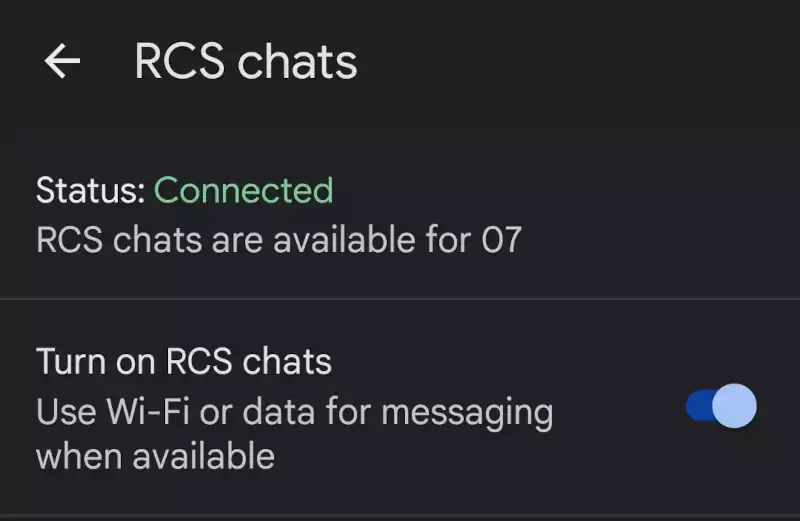
Look for ‘Status’:
Connected is what you want to see; check ‘Turn on RCS for chats’ is enabled.
Connecting shows that the phone isn’t currently connected to RCS, and you won’t be able to send or receive RCS messages, but SMS and MMS will still function as a backup.
The Fix
To fix the RCS Connecting message, you need to:
Toggle the ‘Turn on RCS chats’ to off.
Leave the toggle off for Eight Days!
At the end of the eighth day, toggle the ‘Turn on RCS chats’ to ‘On.’
Observe the Status change from amber to green and show ‘Connected.’
How it works
You disconnect from the RCS server when you toggle off the RCS chat feature. This may be a Google server or a telco server. This is dependent on the SIM provider’s network capability. If they have their own RCS server, then you will connect to that. If your mobile network provider does not have their RCS server, you will connect to Google’s server, provided by Jibe Mobile.
While you are disconnected or, at least, trying to connect to the RCS server, a clock starts to time out. Each time you try to connect by toggling the switch, you reset the clock.
The clock will time out after eight days, so you must leave the RCS ‘OFF’ for eight days. If you try too soon, the eight-day clock resets and you must wait eight days.
When the clock has timed out, and you attempt to reconnect to RCS, the server will issue your phone a new key. This new key will work, and the old key that didn’t work is dismissed.
Other tips
Another RCS tip not working comes from upgrading your phone or even an OTA update. You are advised to turn off RCS chats by toggling the ‘Turn on RCS chats’ off before changing SIM, OTA updating your phone, or copying the data from your old phone to the new one. Only switch the ‘Turn on RCS chats’ after the update or SIM card swap.
These tips can help you avoid the annoying RCS Status: Connecting problem and then having to wait while you apply the fix.
Source
The forum thread that discusses the problem and provides the abovementioned solution is available here.
Leave a Reply